

Your WordPress media.
Finally organised.
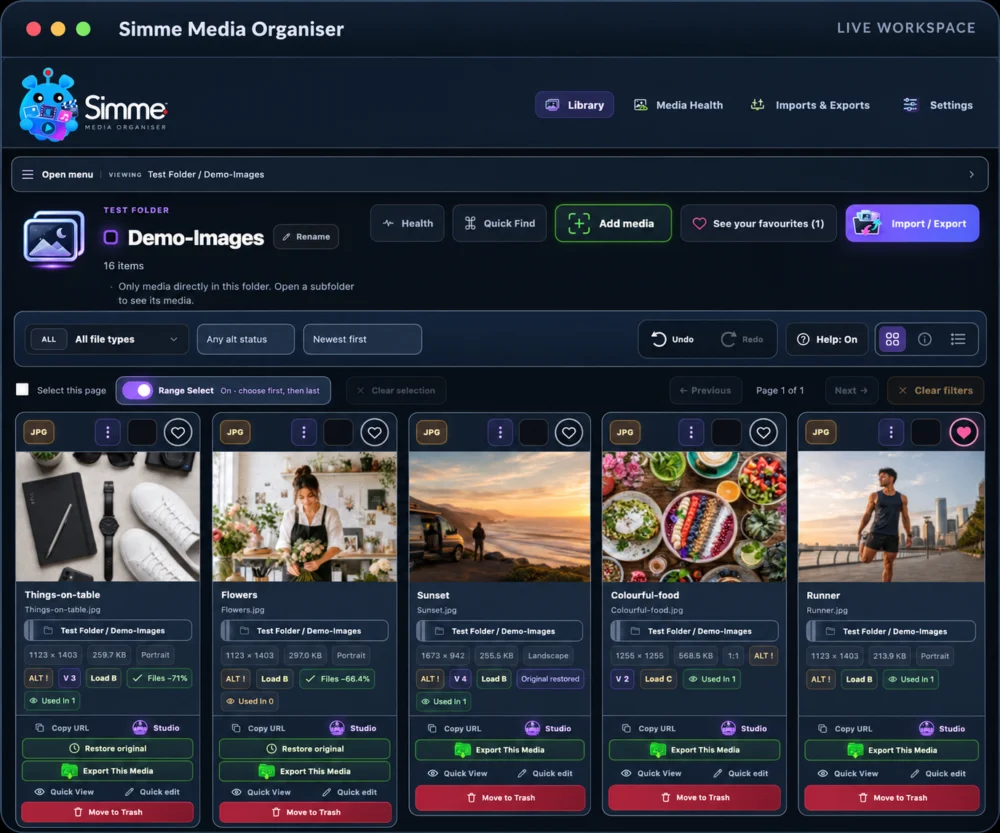
A visual, non-destructive workspace for organising, checking, preparing and reusing WordPress media — with virtual folders, Image Studio, Social Asset Creator, Media Health, protected masters and portable packages.
- Existing URLs stay intact
- Local WordPress tools
- Protected masters
- Social-safe workflows
See what the organiser
actually feels like to use.
The tour is becoming genuinely interactive. Slides 01 and 02 are Live UI Demos built from real Simme Media Organiser states; the remaining screens will be converted one by one.
Follow the cursor · click the UI · swipe between demos


One organised workspace instead of a media maze.
Explore the real Library UI. Follow the animated cursor or click the controls yourself to try Quick Find, favourites, view modes and Range Select.


Prepare a version without sacrificing the master.
Explore the real Image Studio workflow. Follow the cursor or launch a focused demo to inspect backgrounds, crop for a social destination, preview the result, save a working version and safely re-edit it.

See the risky space before the platform hides it.
Optional transparent overlays leave the true safe area visually clear while trim, interface and caution zones are colour coded around it.

Pick the destination before you make the crop.
Choose a platform and working canvas, then let Studio tell you whether the source has enough pixels and whether safe-zone guidance is available.

A master you can trust, with versions you can actually use.
Compare, copy URLs, choose a preferred version or explicitly publish to WordPress. Working versions remain separate until you decide otherwise.

See the output before you create another file.
Preview the crop and output format first, then use the estimated file size and load grade to decide whether the new version is actually worth creating.

Maintenance signals gathered into one local control centre.
ALT coverage, heavy media, duplicates, visual matches, usage signals and organisation gaps are surfaced together without turning every signal into a destructive action.
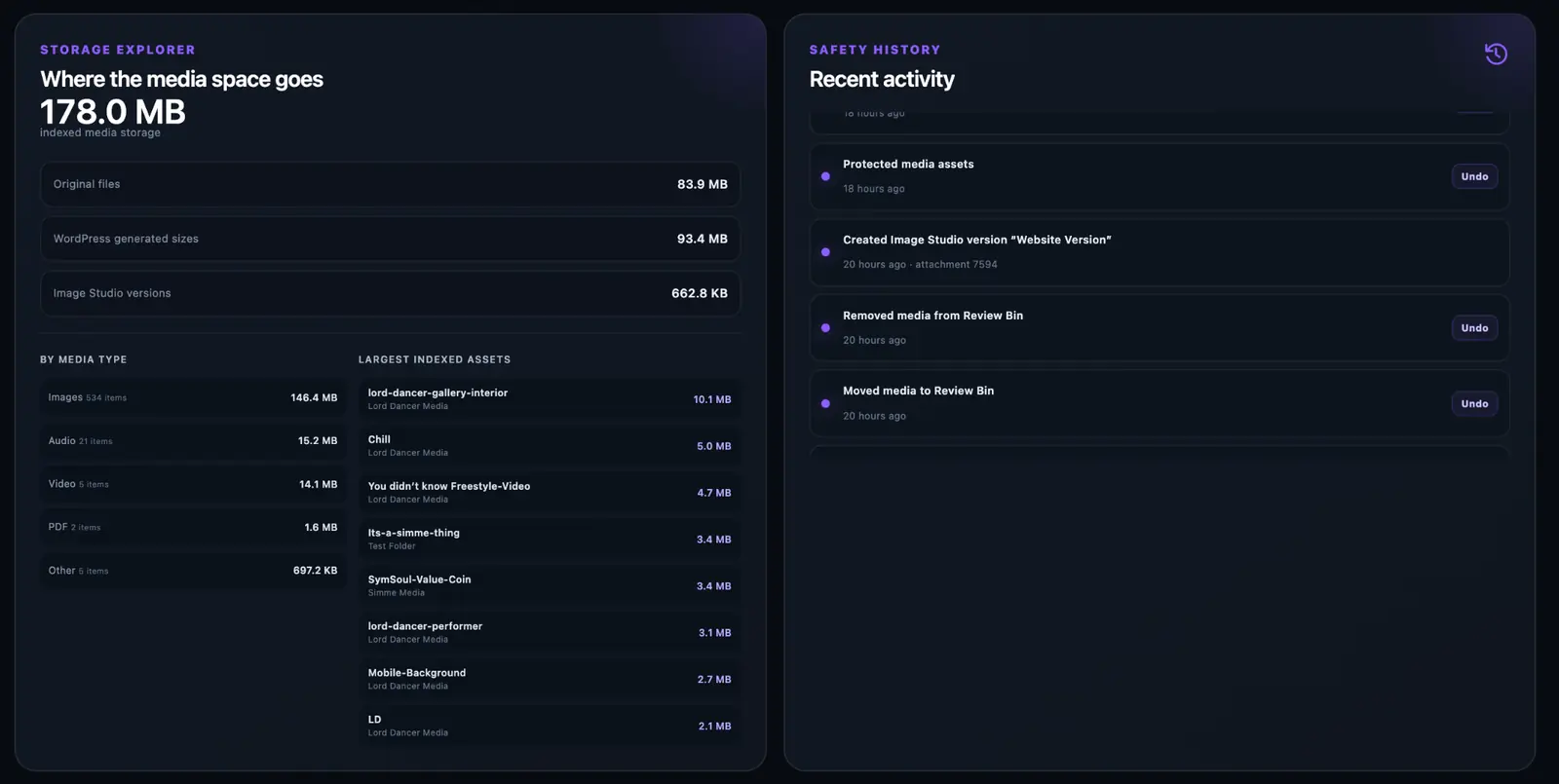
See where the space goes — and what changed recently.
Storage Explorer separates originals, generated sizes and Studio versions, while Safety History gives reversible actions a visible trail instead of hiding them from view.
Folders that organise.
Not folders that move files.
Simme uses virtual organisation. Your original WordPress attachment IDs, filenames, upload paths and live URLs stay where WordPress put them. You gain a much better workspace without creating a migration problem.
Build a structure that makes sense to you.
Create parent folders, nested folders and colour-coded groups without physically moving the media your website already uses.
Keep important media one click away.
Mark useful files across every folder and return to them from a global favourites view.
Put a guardrail around files that matter.
Protection prevents important live assets being casually moved into destructive workflows.
Organise dozens of files without tedious clicking.
Range selection, page selection and the floating control panel turn repetitive media work into a fast workflow.
- Attachment IDunchanged
- Public URLunchanged
- Original file pathunchanged
- Builder compatibilitypreserved
 Protected master
Look closer
Protected master
Look closer
Edit for the web.
Keep the master safe.
Image Studio turns image preparation into a deliberate workflow. Build from the protected master, preview changes before saving, create named working versions and publish to WordPress only when you are happy with the result.
Build for the platform.
See the unsafe space before you publish.
This is the real Social Asset Creator workflow. Choose the destination and target canvas, then keep the safe-zone overlay visible while you check the same crop against Light, Dark and Checker transparency backgrounds.


Know what needs attention.
Before you touch anything.
Media Health brings performance, ALT coverage, duplicates, visual matches, usage signals, storage and safety history into one local WordPress view — then deliberately keeps the difference between “worth reviewing” and “safe to delete” clear.
Surface missing ALT text and move directly into rapid editing instead of opening attachments one by one.
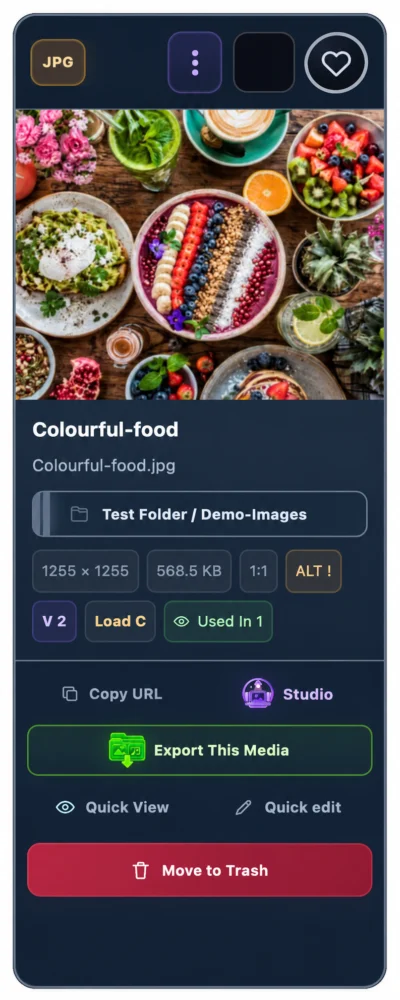
Load grades make it easier to decide what is actually worth taking into Image Studio.
Use Where Used and Review Bin as evidence and staging before permanent deletion.
Review resized or recompressed variants without pretending every similar image is the same file.
See where the space goes. See what changed.
Separate original files, WordPress-generated sizes and Image Studio versions, then pair that storage view with a recent-action history and Undo support for reversible operations.
Your organisation should
travel with your media.
Simme can package organised media for backup or migration, preserve folder structure and carry useful metadata alongside the files instead of forcing you to rebuild your system from scratch.
Move organised media deliberately.
Create and verify portable packages rather than relying on a loose folder of files and memory.
Take the URLs with you.
Export selected media URLs in a clean developer-friendly pack for site work and handover.
Make organisation reversible.
Supported organisational and metadata actions leave a history so mistakes are easier to recover from.
More than a folder plugin.
The point is not to bolt twelve unrelated tools onto WordPress. The point is to make the jobs around media feel like parts of one coherent workspace.
Virtual folders
Build a nested media structure without changing physical upload paths.
Quick ALT editing
Fix missing or weak ALT text without opening a separate WordPress edit screen.

Favourites
Keep useful media accessible across every folder and Smart View.

Protected assets
Put important live files behind a deliberate safety state.
Image Studio
Crop, resize, transform, preview and create protected working versions.

Social Asset Creator
Prepare platform canvases with fit guidance and optional safe zones.
Media Health
Surface heavy files, ALT gaps, duplicates and maintenance signals.

Review Bin
Use a safe holding area before permanent deletion.
Smart Views
Jump to useful slices such as recently added, unfiled or potentially unused.
Where Used
Inspect known local references before changing or removing media.
Portable packages
Carry media organisation into backups and migration workflows.
WordPress picker
Use organised media while still handing builders normal WordPress attachments.
Simme keeps getting
smarter, clearer and safer.
Explore the improvements customers will notice first, or open the complete tracked development history to see how Media Organiser evolved from Beta47 through Beta105.
 Beta62 · Beta79 · Beta91
Trace where media is actually used
Used In now focuses on meaningful website destinations rather than attachment bookkeeping, with clearer evidence for pages, snippets, configuration references and possible versus confirmed usage.
 Beta69 · Beta90 · Beta92
Arrange your Library your way
The Library remembers your browsing state and can now preserve your own media-card arrangement inside folders and views, without losing that layout when you filter or search.
 Beta52 · Beta93–97
Folders behave like folders
Folders can be dragged, reordered, moved inside one another or returned to root. Deletion is deliberately gated, while media and nested folders are preserved instead of being silently destroyed.
 Beta47–51 · Beta57 · Beta70–80 · Beta98–100
Image Studio protects the master
Re-editing, Reset changes, Look Closer, Quick Look and a responsive versions drawer now work around a protected original so experimentation stays useful without sacrificing the source image.
 Beta58 · Beta64–68 · Beta77
Media Health is easier to understand
Library Index and Used In Index now have their own progress and status, while dedicated health icons make performance, duplicates, visual review, integrity and organisation easier to scan.
 Beta81–89 · Beta101–102
A clearer Import / Export journey
The header now shows one continuous media packet travelling into Simme, being processed and leaving as a verified package, supported by a dedicated Import / Export icon and consistent action sizing.
 Beta54–56 · Beta90
One Library menu everywhere
The compact Open menu / Viewing / current folder pattern now stays consistent across screen sizes, with drawers contained to the Simme workspace rather than escaping across the browser.
 Beta103–104
File-type filtering finally looks like Simme
The plain All Types selector is now a visual File Types panel using the same badge language as media cards, and Reset Filters correctly returns it to All file types.
Beta105
WordPress Version Details becomes a real release story
Updater metadata is now designed to refresh faster and carry branded assets plus useful Description, Installation, FAQ, Screenshots, Changelog and Other Notes content inside WordPress itself.
Beta47–Beta106, newest first.
The notes below retain the tracked development detail supplied by Media Dev. The overview above groups repeated engineering iterations into the customer-facing improvements they created.
Beta106BETA Latest published Simme Media Organiser releaseA visual, non-destructive WordPress media workspace. Performance & ReliabilityUI & Accessibility
Release 1.2.0-beta106.
Beta105BETA Version details become useful — and fresherUpgrader metadata now refreshes faster and supports richer WordPress-native Version Details content. UI & AccessibilityPerformance & Reliability
- Release metadata refreshes much faster instead of being held for six hours.
- Opening Version Details requests fresh Simme release information.
- Administrators now have a manual Refresh Simme update info control in the Plugins screen.
- The updater contract now supports Description, Installation, FAQ, Screenshots, Changelog and Other Notes tabs plus branded icon and banner assets.
Beta104BETA Reset Filters really resets File TypesFixed Reset Filters so the visual File Types control also returns to All file types and synchronises correctly with the underlying filter state. LibraryUI & AccessibilityPerformance & Reliability
- Fixed Reset Filters so the visual File Types control also returns to All file types and synchronises correctly with the underlying filter state.
Beta103BETA File Types becomes a visual Simme filterReplaced plain All Types selector with a proper Simme File Types dropdown. LibraryUI & Accessibility
- Replaced plain All Types selector with a proper Simme File Types dropdown.
- Uses the same visual file-type badge panels as media cards.
- Added specific server-side MIME filters plus broad image/document/audio/video choices.
Beta102BETA Top actions use one consistent heightNormalised the entire top action row so Health, Quick Find, Add media, Favourites, Help and Import / Export use the same height. Import / ExportUI & AccessibilityMedia Health
- Normalised the entire top action row so Health, Quick Find, Add media, Favourites, Help and Import / Export use the same height.
Beta101BETA A dedicated Import / Export iconAdded new dedicated transparent Import / Export icon directly inside the plugin. Import / ExportUI & Accessibility
- Added new dedicated transparent Import / Export icon directly inside the plugin.
- Asset tightly cropped to avoid large transparent margins.
Beta100BETA Look Closer now measures the live StudioLook Closer sizing changed to explicit live Studio-shell measurements in JavaScript. Image StudioUI & AccessibilityPerformance & Reliability
- Look Closer sizing changed to explicit live Studio-shell measurements in JavaScript.
- Image viewport gets measured remaining height rather than relying on fragile inherited CSS heights.
Beta99BETA Look Closer gets more useful spaceLook Closer containment moved toward full Studio-shell sizing to avoid tiny portrait rendering. Image StudioUI & AccessibilityPerformance & Reliability
- Look Closer containment moved toward full Studio-shell sizing to avoid tiny portrait rendering.
Beta98BETA Look Closer stays inside Image StudioLook Closer constrained to Image Studio instead of escaping outside its panel. Image StudioUI & AccessibilityPerformance & Reliability
- Look Closer constrained to Image Studio instead of escaping outside its panel.
Beta97BETA Create Folder always opens above the LibraryFixed Create Folder modal opening underneath the universal Library drawer. FoldersUI & AccessibilityPerformance & Reliability
- Fixed Create Folder modal opening underneath the universal Library drawer.
- Drawer now closes first and folder modal uses a higher safe layer.
Beta96BETA A simpler two-stage folder delete gateRemoved typed folder-name deletion test. FoldersUI & Accessibility
- Removed typed folder-name deletion test.
- Replaced with a clearer two-stage button gate: Review then Delete.
Beta95BETA Folder deletion becomes more reliableRemoved failing modal-to-modal folder-delete hand-off. FoldersUI & AccessibilityPerformance & Reliability
- Removed failing modal-to-modal folder-delete hand-off.
- Final deletion step moved into the same dialog with visible deleting/success/error states.
Beta94BETA Cleaner card dragging and safer folder deletionMedia-card drag grip moved into a dedicated slim rail to avoid header-control overlap. FoldersUI & AccessibilityPerformance & Reliability
- Media-card drag grip moved into a dedicated slim rail to avoid header-control overlap.
- Folder-delete server verification hardened.
Beta93BETA Folders finally behave like foldersFolder tree made fully draggable. FoldersUI & Accessibility
- Folder tree made fully draggable.
- Folders can be placed before/inside/after another folder or returned to root.
- Added accessible non-drag Move Folder control.
- Gated folder deletion introduced.
- Media can return to Main Media Library/Unfiled or move to Lost Property.
- Child folders preserved/promoted instead of recursively deleted.
Beta92BETA Arrange media cards your own wayPersistent custom media-card positioning added. LibraryFolders
- Persistent custom media-card positioning added.
- Drag handle introduced beside file type.
- Layout saved by WordPress user and folder/view.
- Filters/search preserve the underlying custom layout.
- Remove Custom Positioning added as a gated destructive reset of layout only.
Beta91BETA Used In focuses on real website destinationsUsed In reframed around real website traceability. Used InPerformance & Reliability
- Used In reframed around real website traceability.
- Attachment’s own _wp_attached_file / _wp_attachment_metadata records excluded from meaningful usage.
- Page destinations grouped rather than inflated by duplicate builder/meta hits.
- Live/non-live content distinction improved.
- Code Snippets identification and shortcode placement tracing added where provable.
- Stale usage-index rows excluded from totals.
Beta90BETA One compact Library menu everywhereCompact Open menu / Viewing / current folder Library navigation made universal at all screen sizes. LibraryUI & AccessibilityFolders
- Compact Open menu / Viewing / current folder Library navigation made universal at all screen sizes.
Beta89BETA Approved relay asset locked inConfirmed the approved continuous relay asset is the exact in-plugin asset used by Imports & Exports. Import / ExportUI & Accessibility
- Confirmed the approved continuous relay asset is the exact in-plugin asset used by Imports & Exports.
Beta88BETA One continuous media packet journeyRelay rebuilt around one continuous moving packet from far left to far right. Import / ExportUI & Accessibility
- Relay rebuilt around one continuous moving packet from far left to far right.
- Visual appearance changes underneath Simme instead of handing between two independent packets.
Beta87BETA Approved relay wired into the headerFinal corrected relay explicitly wired into the Imports & Exports header with versioned cache-busting. Import / ExportUI & AccessibilityImage Studio
- Final corrected relay explicitly wired into the Imports & Exports header with versioned cache-busting.
Beta86BETA Relay centre geometry correctedRelay centre geometry corrected; large processing disc stopped masking packets too early. Import / ExportUI & Accessibility
- Relay centre geometry corrected; large processing disc stopped masking packets too early.
Beta85BETA One shared relay hand-off pointIncoming/outgoing packet hand-off moved to a shared hidden centre point behind Simme. Import / ExportUI & Accessibility
- Incoming/outgoing packet hand-off moved to a shared hidden centre point behind Simme.
Beta84BETA Relay centre movement refinedFurther relay timing/visibility refinement around the centre hand-off. Import / ExportUI & Accessibility
- Further relay timing/visibility refinement around the centre hand-off.
Beta83BETA A more natural relay hand-offRelay hand-off refined; central Simme dock placed above travelling elements for a more natural pass-through effect. Import / ExportUI & Accessibility
- Relay hand-off refined; central Simme dock placed above travelling elements for a more natural pass-through effect.
Beta82BETA Relay travel feels more completeRelay packet travel timing improved so incoming/outgoing cards cover more of the route. Import / ExportUI & Accessibility
- Relay packet travel timing improved so incoming/outgoing cards cover more of the route.
Beta81BETA Import / Export gets a Simme media relayReplaced weak Imports & Exports line animation with compact Simme media relay SVG. Import / ExportUI & Accessibility
- Replaced weak Imports & Exports line animation with compact Simme media relay SVG.
Beta80BETA Versions stay collapsed until you askVersions drawer made collapsed-by-default at every screen width. Image StudioUI & Accessibility
- Versions drawer made collapsed-by-default at every screen width.
- Permanent rail only appears when deliberately pinned and space allows.
Beta79BETA Used In scanning gets much fasterUsed In scan performance overhaul. Used InPerformance & ReliabilityMedia Health
- Used In scan performance overhaul.
- Usage-only scan path avoids unnecessary health recalculation.
- Adaptive batching and reduced broad wildcard database searches.
- Progress-count synchronisation improved.
Beta78BETA Control Centre gets a cleaner structureFloating Control Centre cleaned up. UI & Accessibility
- Floating Control Centre cleaned up.
- Removed redundant Trash label and strengthened internal panel separation.
Beta77BETA Secondary text becomes easier to readMuted/secondary text contrast subtly improved in Library sidebar and Media Health. LibraryMedia HealthUI & Accessibility
- Muted/secondary text contrast subtly improved in Library sidebar and Media Health.
Beta76BETA Versions drawer gains Keep open / PinVersions drawer moved to Studio edge. Image StudioUI & AccessibilityUsed In
- Versions drawer moved to Studio edge.
- Added Keep open / Pin behaviour with persistent preference.
Beta75BETA Versions move into a side railVersions moved away from dropping below the canvas. Image StudioUI & Accessibility
- Versions moved away from dropping below the canvas.
- Desktop right rail / narrow drawer model introduced.
Beta74BETA Re-edit toolbar slimmed againRe-edit toolbar slimmed further; close control separated so it no longer overlaps Reset/Return actions. Image StudioUI & Accessibility
- Re-edit toolbar slimmed further; close control separated so it no longer overlaps Reset/Return actions.
Beta73BETA A clearer Studio close controlClose control moved to a clearer normal top-right position; collapse behaviour improved. Image StudioUI & Accessibility
- Close control moved to a clearer normal top-right position; collapse behaviour improved.
Beta72BETA A more compact Re-edit toolbarRe-edit toolbar compactness refined. Image StudioUI & Accessibility
- Re-edit toolbar compactness refined.
Beta71BETA Re-edit controls stay containedRe-edit control containment improved. Image StudioUI & Accessibility
- Re-edit control containment improved.
Beta70BETA Re-edit actions become more organisedRe-edit actions reorganised into a more uniform control group. Image StudioUI & Accessibility
- Re-edit actions reorganised into a more uniform control group.
Beta69BETA The Library remembers where you wereLibrary workspace memory added across plugin sections: folder/view, page, search, filters, sorting, view mode, expanded branches and scroll position. LibraryPerformance & ReliabilityFolders
- Library workspace memory added across plugin sections: folder/view, page, search, filters, sorting, view mode, expanded branches and scroll position.
Beta68BETA Health icon set refinedReplaced the Health icon set with revised supplied assets while keeping the established mapping. Media HealthUI & Accessibility
- Replaced the Health icon set with revised supplied assets while keeping the established mapping.
Beta67BETA Dedicated Media Health icons arriveIntroduced dedicated custom Media Health icon assets for Library Index, Used In, Performance, Duplicates, Visual Review, Integrity and Organisation. Media HealthUI & AccessibilityUsed InPerformance & Reliability
- Introduced dedicated custom Media Health icon assets for Library Index, Used In, Performance, Duplicates, Visual Review, Integrity and Organisation.
Beta66BETA Refresh action gets clearer contrastRefresh Library Index button contrast corrected. Media HealthUI & Accessibility
- Refresh Library Index button contrast corrected.
Beta65BETA Health score stays perfectly circularHealth score display locked to a true circle across layouts. Media HealthUI & Accessibility
- Health score display locked to a true circle across layouts.
Beta64BETA Library and Used In indexes split clearlyMedia Health scan UX split into Library Index and Used In Index, each with separate progress and state. Media HealthUI & AccessibilityUsed In
- Media Health scan UX split into Library Index and Used In Index, each with separate progress and state.
Beta63BETA Quick View shows the whole imageQuick View / Quick Look changed to true whole-image fit across aspect ratios. LibraryImage StudioUI & Accessibility
- Quick View / Quick Look changed to true whole-image fit across aspect ratios.
Beta62BETA Used In becomes a real usage indexMajor Used In redesign. Used InMedia HealthPerformance & Reliability
- Major Used In redesign.
- Background/resumable usage index.
- Automatic queueing for new uploads and changed content.
- Conservative Possibly Unused logic.
- Broader reference detection across content, generated sizes, featured images, WooCommerce, builder/meta data, options and supported Code Snippets storage.
Beta61BETA Quick View arrives on Library cardsAdded card-level Quick View beside Quick Edit in the main Library. LibraryUI & Accessibility
- Added card-level Quick View beside Quick Edit in the main Library.
Beta60BETA A calmer, clearer loading storyAdded gentle loader character motion and staged loading messages. Image StudioUI & Accessibility
- Added gentle loader character motion and staged loading messages.
Beta59BETA The real Simme character joins Studio loadingIntegrated the supplied exact animated Simme character SVG into the Image Studio loading screen. Image StudioUI & Accessibility
- Integrated the supplied exact animated Simme character SVG into the Image Studio loading screen.
Beta58BETA Load grades become easier to readLoad-grade guide A–E changed into clearer colour-coded circular badges. Media HealthUI & Accessibility
- Load-grade guide A–E changed into clearer colour-coded circular badges.
Beta57BETA Quick Look reaches saved versionsAdded Quick Look to saved version cards and master/version inspector cards. Image Studio
- Added Quick Look to saved version cards and master/version inspector cards.
Beta56BETA The Library drawer stays inside SimmeSmall-screen Library drawer/backdrop contained to the plugin workspace rather than the browser viewport. LibraryUI & Accessibility
- Small-screen Library drawer/backdrop contained to the plugin workspace rather than the browser viewport.
Beta55BETA One Media Menu for constrained layoutsUniversal Media Menu introduced with desktop hide/collapse and narrower drawer behaviour. LibraryUI & Accessibility
- Universal Media Menu introduced with desktop hide/collapse and narrower drawer behaviour.
Beta54BETA A more responsive LibraryResponsive Library/sidebar refinement. LibraryUI & Accessibility
- Responsive Library/sidebar refinement.
- Compact navigation introduced on constrained widths.
- List-view actions and rows reflowed more cleanly.
Beta53BETA Stronger contrast on coloured actionsStandardised white text/icons on strong coloured buttons for better contrast. UI & Accessibility
- Standardised white text/icons on strong coloured buttons for better contrast.
Beta52BETA Long folder names behave properlyFixed Library folder-header/title wrapping for longer names. LibraryFolders
- Fixed Library folder-header/title wrapping for longer names.
Beta51BETA Cleaner version statusSlimmed version status treatment to a clearer Re-editable · Protected master presentation. Image Studio
- Slimmed version status treatment to a clearer Re-editable · Protected master presentation.
Beta50BETA A clearer protected re-edit workflowRe-edit mode made explicit with clearer version/source wording and Back to Master / Create new version workflow. Image Studio
- Re-edit mode made explicit with clearer version/source wording and Back to Master / Create new version workflow.
Beta49BETA Reset changes without touching the masterAdded Reset changes to restore the last saved editable recipe without altering the protected master. Image Studio
- Added Reset changes to restore the last saved editable recipe without altering the protected master.
Beta48BETA Re-edit becomes a real editing gateRe-edit lock/unlock became a real editing gate rather than visual-only state. Image Studio
- Re-edit lock/unlock became a real editing gate rather than visual-only state.
Beta47BETA Look Closer starts fitting the whole imageRe-edit/Look Closer workflow improvements begin. Image Studio
- Re-edit/Look Closer workflow improvements begin.
- Look Closer changed toward whole-image fit rather than clipping.
Choose another area or return to All.
Make more of your media.
Choose Media Organiser Pro.
Powerful tools to organise, prepare and protect your WordPress media in one considered workspace.
Simme Media Organiser Pro
£19.99A standalone professional WordPress plugin. Your existing media stays where WordPress put it, while Simme gives you more control over how you work with it.
- Visual organisation and safer media workflows
- Image Studio, protected masters and version controls
- Media Health, tracing and portable packages

Questions before you install.
Does Simme Media Organiser move my WordPress files?+
No. Its folder system is virtual. The plugin is designed to organise around the existing WordPress attachment rather than silently relocating the file your live site already references.
Does it replace the normal WordPress Media Library?+
No. WordPress Media Library remains available. Simme adds another organised workspace and an enhanced picker while preserving normal attachment IDs and URLs for builders.
Does Media Health use AI or upload my media elsewhere?+
The current Media Health design is local to WordPress and does not require an AI API, external media analysis service or usage credits.
Are potentially-unused files safe to delete?+
No automatic claim like that is made. A potentially-unused signal means Simme could not find a supported local reference. It should be reviewed with Where Used and the Review Bin before permanent deletion.
How do updates work?+
Updater-enabled releases read a public Simme release feed using WordPress' supported third-party Update URI mechanism. When a newer published version is available, WordPress can present it in the normal Plugins update interface.

© 2026 Simme™. All rights reserved.
